Generators
A generator decides how Scene Insight partitions your level into clusters before any metrics are collected. You can enable several at once — each contributes clusters, and overlaps are resolved by priority.
Enable / disable generators from the Generators dropdown in the panel toolbar, or globally under Project Settings.
| Generator | Best for |
|---|---|
| Grid | Even, predictable coverage of any level |
| Octree | Levels with very uneven actor density |
| World Partition | Open-world / WP levels — analyze by streaming cell |
| Tag / Folder | Logical grouping (e.g. by gameplay area) |
| Manual Volume | Hand-authored zones you care about precisely |
Priority and exclusivity
When multiple generators are active, clusters are merged in this priority order:
Manual Volume > Tag / Folder > World Partition > Octree > Grid
A Cluster Volume with Exclusive Zone enabled (the default) removes the actors it owns from every lower-priority generator, so an actor is never counted in two zones. This lets you carve out a precise hand-authored zone over an otherwise grid-covered level.
Oversized actor filtering
Before clustering, actors whose bounding-box max dimension exceeds the Oversized Actor Threshold (default 20000 cm = 200 m) are excluded from all generators. This stops sky spheres, skybox meshes and landscape-as-static-mesh from inflating the world bounds and collapsing the grid into a handful of giant cells. Set the threshold to 0 to disable it. See Settings.
Grid
Subdivides the level's bounding box into a uniform 3-D grid. An actor is assigned to the cell that contains its origin (center of bounds). Each non-empty cell becomes one cluster.
| Setting | Default | Notes |
|---|---|---|
| Grid Cell Size | 5000 cm (50 m) on each axis | Smaller cells = finer resolution, more clusters |
| Remove Empty Grid Cells | ✅ On | Discards cells with no actors after assignment |
Grid is the most predictable generator and the best starting point. Shrink the cell size for dense interior levels; grow it for sparse open spaces.
Octree
Adaptive subdivision: the level is recursively split into 8 sub-cells, and a node is split further only when it gets too crowded. Dense areas end up with small cells; empty areas stay large. This concentrates resolution where the cost actually is.
| Setting | Default | Range | Notes |
|---|---|---|---|
| Octree Max Depth | 6 | 1–10 | Maximum recursion depth |
| Octree Max Actors Per Leaf | 50 | ≥ 1 | Split a node above this actor count |
| Octree Min Triangles Per Leaf | 100000 | ≥ 0 | Split a node above this triangle count |
World Partition
Mirrors the runtime streaming cells of a World Partition level — each cell becomes one cluster, with actors assigned by location overlap. This is the most production-relevant partition for open worlds because it matches what actually streams in together at runtime.
If the level has no World Partition, the generator logs a message and contributes nothing (safe to leave enabled everywhere).
Tag / Folder
Groups actors by their first Actor Tag (or Outliner folder). Each unique tag becomes one cluster; the cluster bounds are the union of its members' bounds. Actors with no tag are ignored.
Use this to analyze logical groupings — e.g. tag everything in your "Market District" and get a single zone for it regardless of where the geometry sits spatially.
Manual Volume
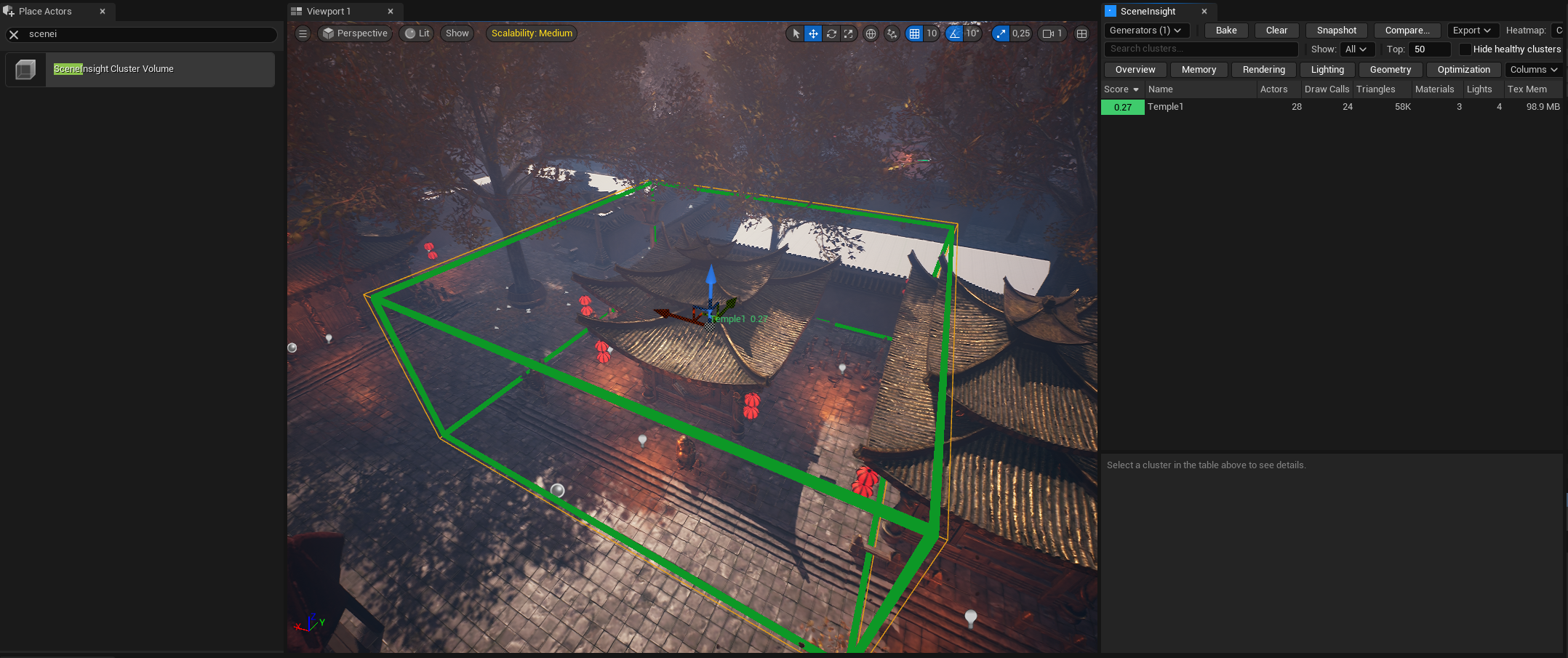
The most precise option: drop SceneInsight Cluster Volume actors into the level to define exactly the zones you want analyzed.
Place one from the Place Actors panel (search SceneInsight Cluster Volume), then shape it like any volume. Any actor whose origin falls inside is assigned to that cluster.
| Property | Default | Description |
|---|---|---|
| Volume Name | (empty) | Name shown in the panel. Falls back to the actor label when empty |
| Debug Color | Black | Custom viewport box color. Leave black to use the score-based heatmap color |
| Exclusive Zone | ✅ True | Removes member actors from all lower-priority generators |
| Budget Profile Override | (empty) | Per-volume budget profile. Overrides the global profile for this cluster only |
A boss arena can tolerate a heavier budget than a traversal corridor. Assign a stricter or looser Budget Profile Override to individual volumes so each zone is scored against the right target.
Ambient audio
After clustering, Scene Insight runs a post-pass that assigns each AAmbientSound in the level to its nearest cluster, so audio memory shows up in the right zone.