Custom Mesh Volume
The Custom Mesh shape uses a Static Mesh asset as the selection volume. The plugin extracts the mesh's convex collision hulls to define the selection boundary — perfect for non-rectangular selection shapes.
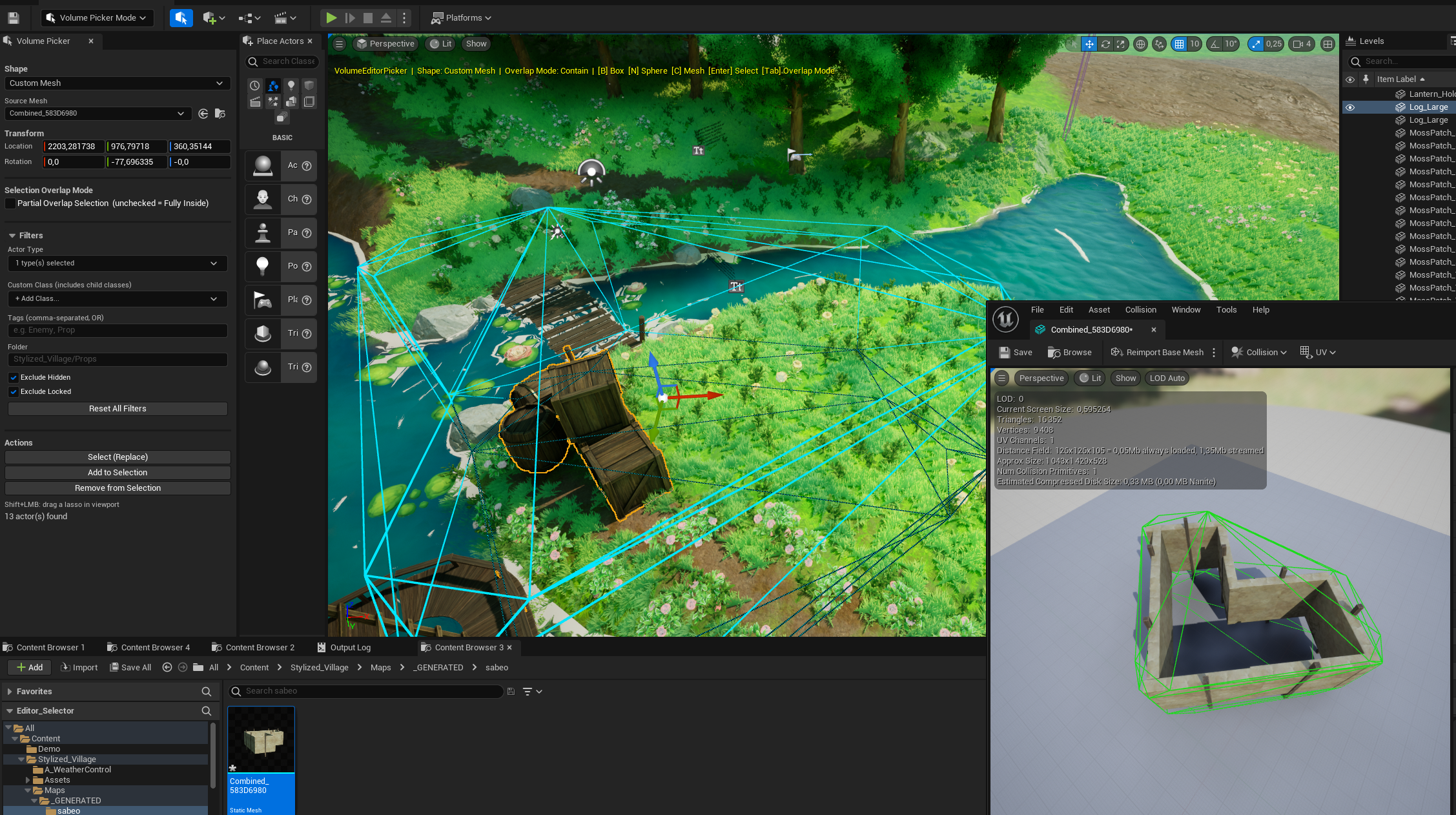
Activate
Press C or select Custom Mesh in the Shape dropdown.
Setup
- A Source Mesh asset picker appears in the control panel.
- Select any Static Mesh from your project.
- The mesh's collision geometry defines the selection volume.
warning
If the selected mesh has no collision setup, the plugin falls back to using the mesh's axis-aligned bounding box (AABB). A warning is displayed in orange in the panel:
"Warning: mesh has no collision setup. Using bounding box as fallback."
For best results, make sure your mesh has convex collision set up in the Static Mesh Editor.
Transform controls
| Control | Description |
|---|---|
| Location X/Y/Z | Center position of the volume |
| Rotation Pitch/Yaw/Roll | Orientation in degrees |
| Scale | Uniform or per-axis scale via gizmo |
Selection behavior
- In Intersect mode: selects if the actor's bounds overlap the convex hull(s)
- In Contain mode: selects only if the actor's bounds are fully inside the convex hull(s)