Project Settings
AsyncLoad Toolkit settings are found in Edit → Project Settings → Game → AsyncLoad Toolkit.
All settings are saved to your project's Config/DefaultGame.ini.
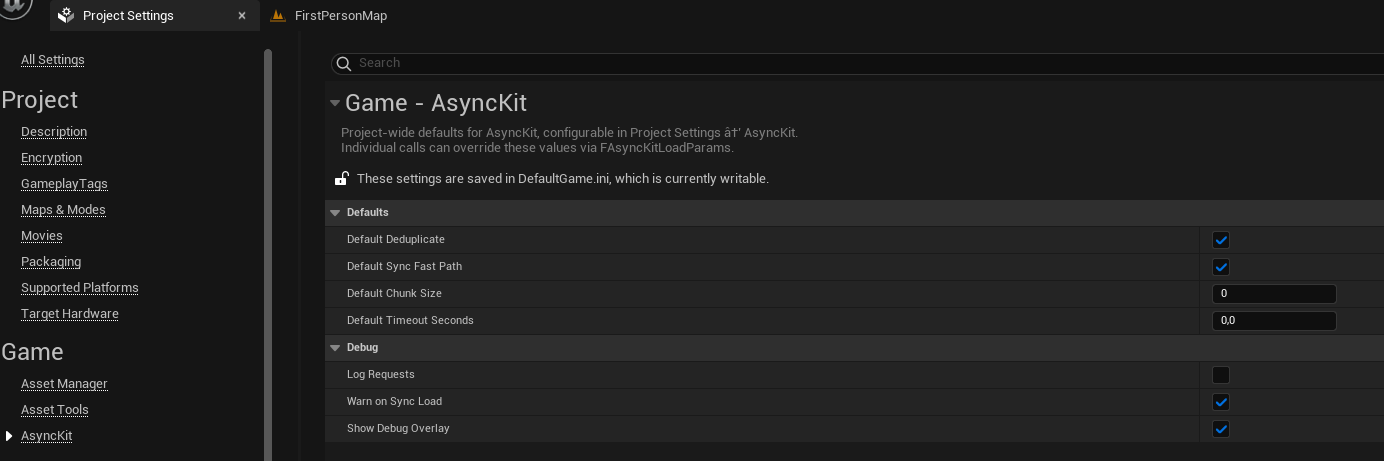
Defaults
These values are used when a load function is called with a default-constructed FAsyncKitLoadParams. Individual calls can always override them.
| Setting | Default | Description |
|---|---|---|
| Default Deduplicate | true | Join identical in-flight requests automatically |
| Default Sync Fast Path | true | Fire callback this frame if assets are already in memory |
| Default Chunk Size | 0 | 0 = no chunking; N = batch size for anti-OOM loading |
| Default Timeout Seconds | 0.0 | 0 = no timeout; N = fail after N seconds |
Debug
| Setting | Default | Description |
|---|---|---|
| Log Requests | false | Print every request start and completion to the Output Log |
| Warn On Sync Load | true | Print a warning when a synchronous (blocking) load is called |
| Show Debug Overlay | false | Display in-flight requests on screen (also toggled by AsyncLoadToolkit.Debug 1) |
Console commands
| Command | Description |
|---|---|
AsyncLoadToolkit.Debug 1 | Enable the in-flight overlay |
AsyncLoadToolkit.Debug 0 | Disable the in-flight overlay |
AsyncLoadToolkit.DumpRetained | Log all currently retained assets |