Getting Started
Your first async load
The quickest way to load a single asset and use it when it's ready:
- In any Blueprint, add a Soft Object Reference variable pointing to your asset.
- Call Load Asset (from the AsyncKit | Load category).
- In On Loaded, cast the result and use the asset.
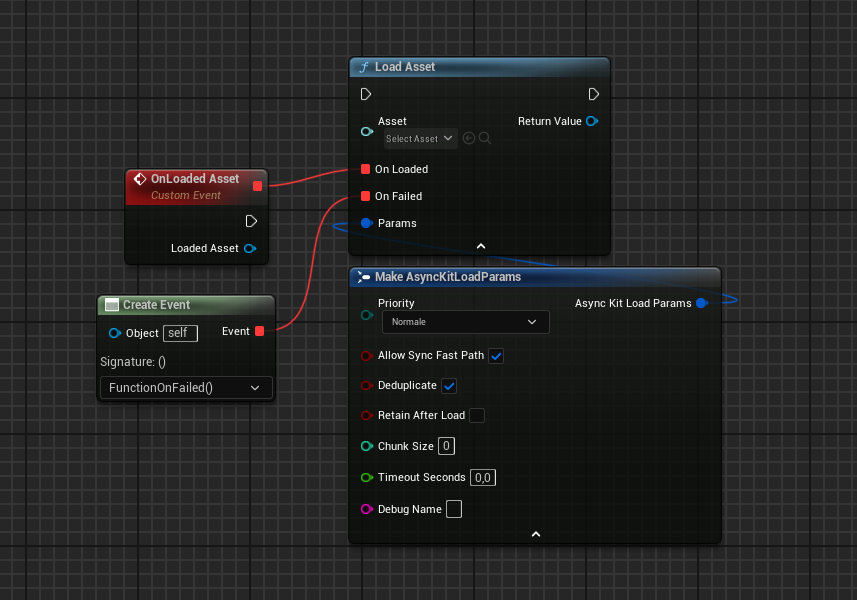
[Soft Object Reference] ──▶ Load Asset ──▶ On Loaded ──▶ Cast To StaticMesh ──▶ Set Static Mesh
                                         └▶ On Failed ──▶ Print String "Load failed"
The function returns immediately. On Loaded fires on the game thread when the asset is ready — which may be the same frame if the asset was already in memory (fast path).
Function graph vs. Event Graph
AsyncLoad Toolkit provides two ways to load assets:
1. Library functions (everywhere)
Found in the AsyncKit | Load category. These are standard BlueprintCallable functions that accept a delegate parameter for the callback.
- ✅ Work in function graphs, macros, interfaces, event graphs
- ✅ The returned
UAsyncKitHandlecan be stored in a variable - ⚠️ The Blueprint execution continues past the node immediately — the callback fires later
Begin Play ──▶ Load Assets ──▶ (continues immediately)
                    └── [On Loaded fires later] ──▶ Do something with assets
2. Async action nodes (Event Graph only)
Found in the AsyncKit category. These are UBlueprintAsyncActionBase nodes with multiple execution output pins.
- ✅ Cleaner visual flow in Event Graphs
- ❌ Cannot be placed in function graphs — this is a Blueprint compiler restriction, not an AsyncKit limitation
- ✅
On CompletedandOn Failedoutput pins work like any other latent node
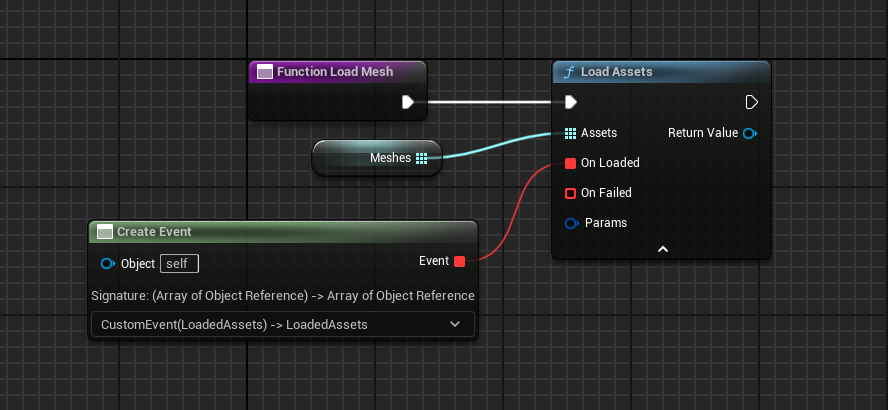
Use the async node when you're in an Event Graph and want the familiar execution-pin flow. Use the library function for everything else — especially inside functions, macros, and interfaces.
Loading multiple assets
To load many assets at once and be notified when all of them are ready:
[Array of Soft Object References] ──▶ Load Assets ──▶ On Loaded (receives TArray<UObject*>)
The On Loaded callback fires only once, after all assets in the array have finished loading. The order of assets in the output array matches the input array order.
Adding a progress bar
Use Load Assets With Progress to receive periodic progress updates (approximately every 0.1 seconds):
Load Assets With Progress
  ├── On Loaded    ──▶ Hide progress bar
  ├── On Progress  ──▶ Set progress bar percent (Progress 0–1)
  └── On Failed    ──▶ Show error message
Cancelling a load
Every load function returns a UAsyncKitHandle. Store it in a variable and call Cancel to abort:
[My Handle Variable] ──▶ Cancel
The On Cancelled delegate on the handle will broadcast. The On Loaded callback will never fire.