Installation
Installing from Fab
- Purchase the plugin on Fab.
- Open the Epic Games Launcher → Library → find AsyncLoad Toolkit.
- Click Add to project and select your Unreal project.
- Open your project, go to Edit → Plugins, search for AsyncLoad Toolkit and enable it.
- Restart the editor when prompted.
Verifying the installation
Open Edit → Project Settings → Game → AsyncLoad Toolkit.
You should see the plugin settings section with defaults for deduplication, chunk size, timeout, and debug options.
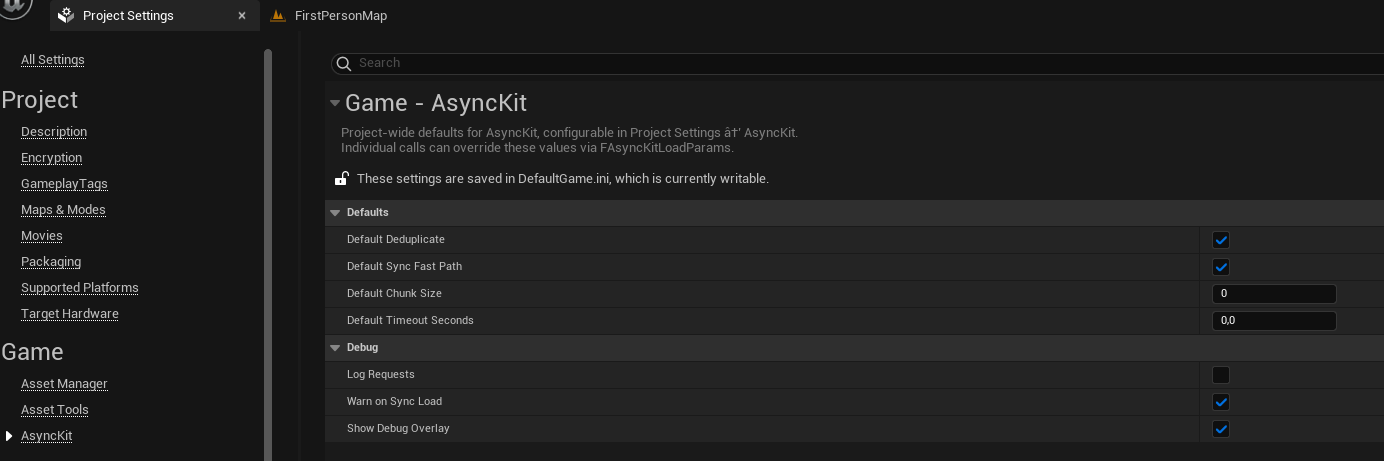
If the section is missing, check the Output Log for errors from LogPluginManager.
Build requirements
AsyncLoad Toolkit is compatible with UE 5.2 through 5.7 and is a Runtime module with LoadingPhase: PreDefault. It depends only on:
CoreCoreUObjectEngine
No third-party dependencies, no editor-only code. The plugin can be used in packaged builds without modification.
C++ projects
If you are using C++ and want to call subsystem methods directly, add "AsyncLoadToolkit" to your module's PublicDependencyModuleNames in your Build.cs.