Function vs. Async Node
AsyncLoad Toolkit provides two forms for every load operation. Understanding the difference is essential for using the plugin correctly.
The problem with async nodes
Unreal's latent actions and UBlueprintAsyncActionBase nodes are implemented in a way that the Blueprint compiler rejects inside function graphs. If you try to place a standard async node (including vanilla Async Load Asset) inside a Blueprint function or macro, you get a compiler error:
"Async tasks are not allowed in functions."
This is a fundamental limitation of the Blueprint VM: function graphs don't have the frame-spanning infrastructure that latent nodes require.
AsyncLoad Toolkit's solution
AsyncLoad Toolkit uses a delegate-based approach for its library functions. Instead of suspending execution across frames, the function:
- Returns immediately (so it's non-latent and valid in function graphs).
- Accepts a delegate parameter (
On Loaded,On Failed) that fires on the game thread when loading completes.
The callback is wired up with Blueprint's Create Event node, which binds a function to the delegate:
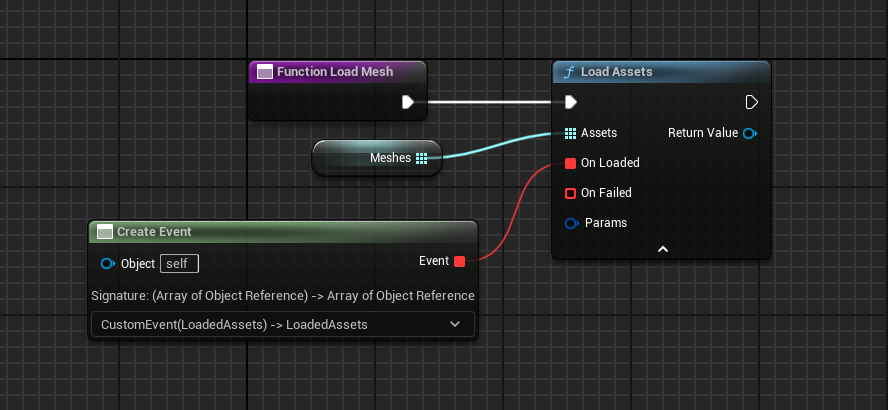
Function Graph:
┌─────────────────────────────┐
│  Load Assets                │
│   Assets: [soft refs]       │  ◀── works here ✅
│   On Loaded: [Create Event] │
│   On Failed: [Create Event] │
└─────────────────────────────┘
When to use each form
| Situation | Use |
|---|---|
| Event Graph, want clean execution pins | Async node (AsyncKit Load) |
| Function graph, macro, interface | Library function (Load Assets) |
| Storing the handle in a variable | Library function (nodes don't surface the handle) |
| Calling from C++ | Subsystem (UAsyncKitSubsystem::RequestLoad) |
Important: execution continues past the function call
When you call a library function, Blueprint execution continues to the next node immediately. The On Loaded callback fires later, on the game thread, when the assets are ready.
Event BeginPlay
  │
  ▼
Load Assets ──── (fires On Loaded later) ────▶ Use assets (CORRECT)
  │
  ▼
Print String "This runs BEFORE On Loaded"      ◀── (CORRECT, expected)
Do not put code after Load Assets that depends on the loaded assets. Put that code inside the On Loaded delegate.
Do not capture references to destroyed actors inside an On Loaded callback. If the actor that initiated the load is destroyed before loading completes, use a weak object reference or check for validity at the start of your callback.